OTP Verification
Enter the OTP that was sent to your mobile number.
Time remaining: 0:30
No Cost EMI is available on cart value of Rs: 4,995/- and above, Additional Exclusive Cashback offers from leading banks! - T&C

Learning guitar is an exciting journey, and before you start mastering chords, riffs, and songs, there is one skill you should pay attention to, and that is tuning. It is important to adjust your strings to the correct pitch because this can make or break the experience of playing even a beautifully crafted instrument. Many beginners assume that poor sound comes from their playing technique, when in reality the issue is often as simple as an untuned guitar.
Whether you have recently purchased your first guitar or are returning to practice after a break, understanding how to tune your instrument correctly can improve your playing experience dramatically. A properly tuned guitar produces balanced notes, cleaner chords, and a more enjoyable sound overall. It also helps develop your musical ear and allows you to play confidently alongside recordings, teachers, or fellow musicians.
The good news is that tuning no longer requires advanced listening skills or years of experience. Modern tools such as the Yamaha YTC5 Clip-on Tuner and the Yamaha Guitar Tuner App make the process accessible for players of every skill level. With a few simple steps and the right approach, you can ensure your guitar sounds its best every time you pick it up.
Tuning a guitar simply means adjusting each string so that it produces the correct note when played open. Every string is designed to reach a specific pitch, and even a slight change in tension can affect how it sounds. If a string is too loose, the note will sound lower than it should. If it's too tight, the pitch will be higher.
Because all six strings work together, one string that's out of tune can make chords sound off and songs feel less polished. That's why tuning is one of the first skills every guitarist learns, regardless of experience level. Most acoustic and electric guitars follow standard tuning, which uses the notes shown below:
| Standard Guitar Tuning | ||
|---|---|---|
| String Number | Note | Position |
| 6th String | E | Thickest String |
| 5th String | A | Bass Range |
| 4th String | D | Lower Mid Range |
| 3rd String | G | Mid Range |
| 2nd String | B | Upper Mid Range |
| 1st String | E | Thinnest String |
A guitar tuner helps ensure each string is at the correct pitch, making practice sessions more productive and enjoyable. Using a Yamaha Guitar Tuner can make the tuning process simple and accurate, especially for beginners learning the basics. Also, if you're finding it difficult to remember the order of the strings, there's a popular memory trick many guitarists use: "Eddie Ate Dynamite, Good Bye Eddie." Each word represents one of the notes in standard tuning, making it easier to recall the sequence when you're still getting familiar with the instrument.
Buy Guitar Tuner OnlineIf you've just started learning guitar, tuning can feel surprisingly confusing. You pluck a string, turn a peg, and somehow the note sounds even more off than before. Many beginners struggle to tell whether a string needs tightening or loosening, while others accidentally adjust the wrong tuning peg. There's also the fear of pulling a string too tight and causing it to snap.
The good news is that every guitarist goes through this stage. As you spend more time with your instrument, you'll become more familiar with how each string should sound and how the tuning pegs respond. Until then, using a reliable tuner can take away much of the guesswork and help you tune with confidence.
The easiest way to tune a guitar is with the help of a tuner. Whether you're using a clip-on tuner or a tuning app, the process is straightforward and becomes second nature with a little practice. For beginners searching for a guitar tuner, options such as the Yamaha YTC5 Clip-on Tuner and Yamaha Guitar Tuner App offer a simple way to get started. Purchase the Yamaha YTC5 Clip-on Tuner from the Yamaha Music Store for reliable tuning at home, in the studio, or on stage. Prefer a digital solution? Simply download the Yamaha Guitar Tuner App and keep your guitar perfectly in tune wherever your music takes you.
Start with the sixth string, also known as the low E string. Pluck the string and check the note shown on the tuner. If the pitch is lower than E, gently tighten the tuning peg. If it's higher, loosen it slightly until the tuner indicates the correct note.
Once the low E string is tuned, move through the remaining strings one by one-A, D, G, B, and finally the high E string. Make small adjustments rather than large turns, as this helps you reach the correct pitch more accurately.
After tuning all six strings, go back and check them again. Adjusting one string can slightly affect the tension of the others, so a quick second pass helps ensure everything is balanced and ready to play.
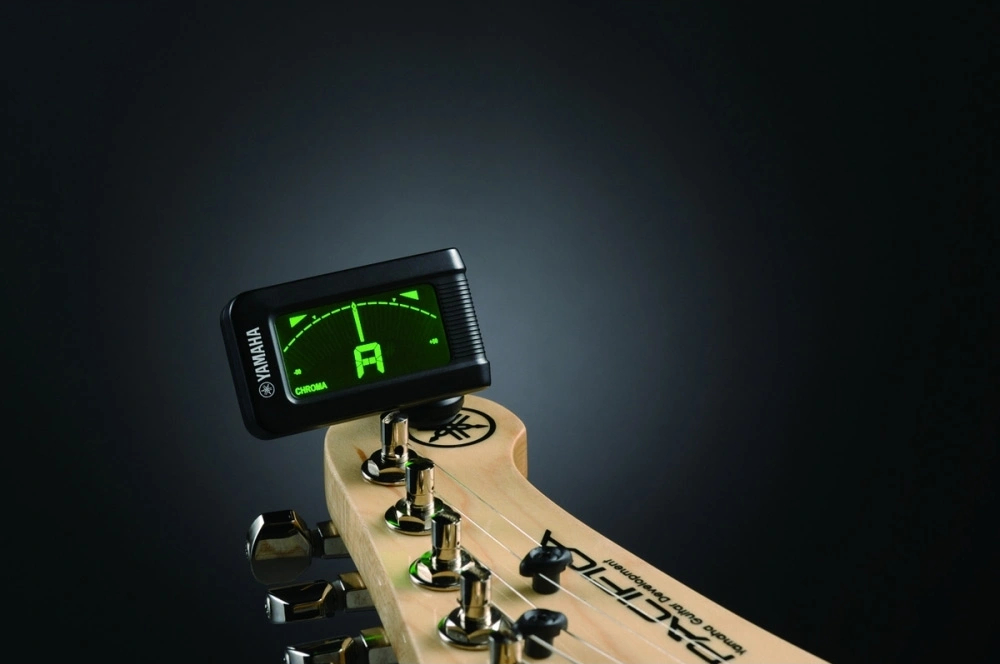
While some experienced players tune by ear, beginners benefit greatly from dedicated tuning devices. A clip-on tuner removes much of the guesswork by providing accurate visual feedback. The Yamaha YTC5 Clip-on Tuner is designed specifically to simplify this process. Instead of relying entirely on surrounding sound, it detects vibrations directly from the instrument. This allows accurate readings even in environments where background noise may interfere with microphone based tuning.
The tuner clips securely onto the headstock and displays pitch information on a clear backlit screen. This makes it suitable for home practice, lessons, rehearsals, and performances alike.
| Feature | Specification |
|---|---|
| Tuning Modes | Guitar, Bass, Ukulele, Chromatic |
| Accuracy | ±0.5 Cent |
| Display | Backlit LCD |
| Detection Method | Vibration Sensor |
| Battery Life | Approx. 25 Hours |
| Design | Compact Clip-On Style |
For beginners who want a straightforward tuning solution without relying on external sound conditions, the Yamaha YTC5 Clip-on Tuner offers a practical and dependable option.
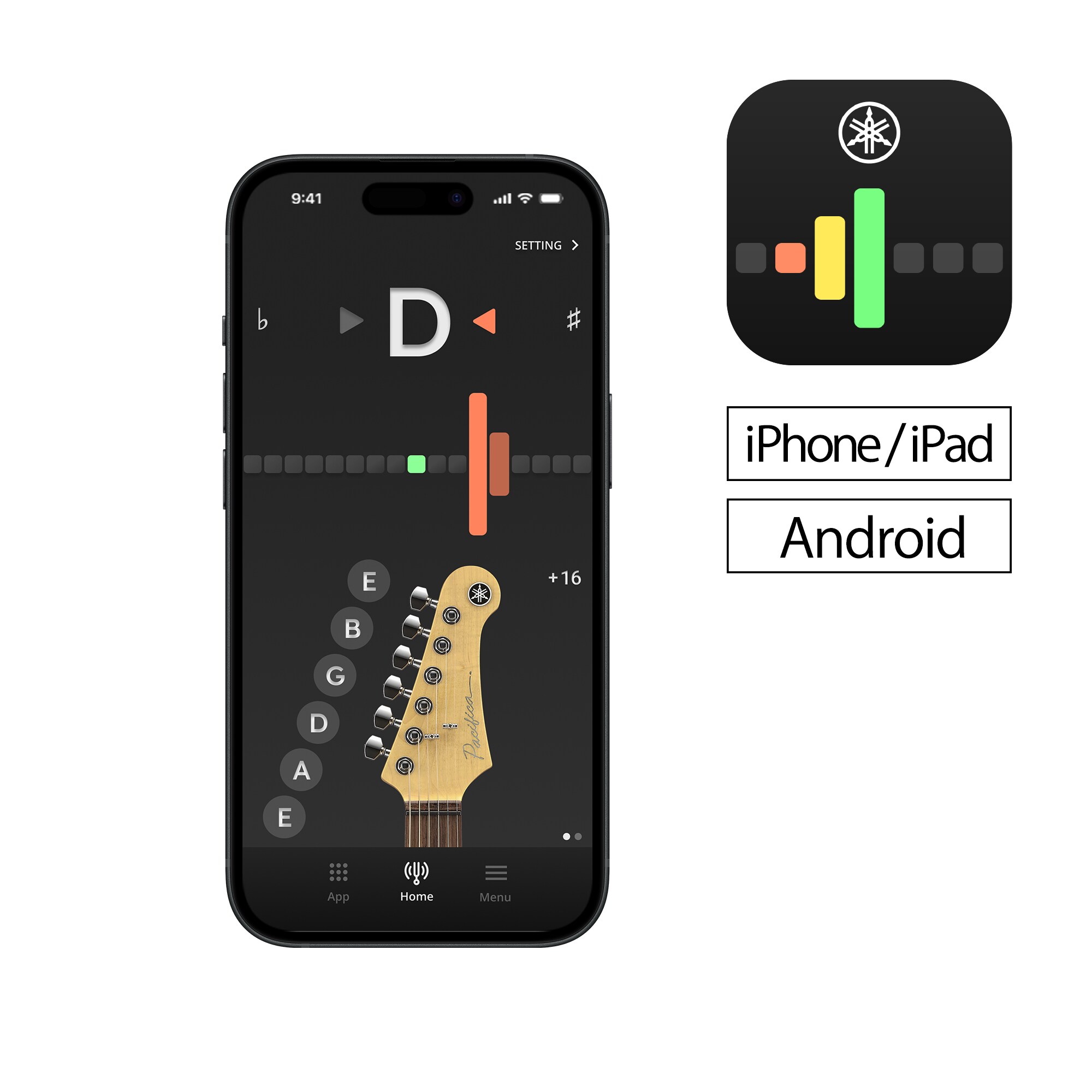
Not everyone wants to carry guitar tuners as a separate accessory during practice. For players who prefer a digital solution, Yamaha also offers a dedicated Guitar Tuner App that transforms a smartphone into a convenient tuning tool.
The application uses your device's microphone to detect pitch and provide real-time feedback. Visual indicators help guide adjustments while preset tuning modes simplify the experience for newcomers.
One of the biggest advantages of the Guitar Tuner App provided by Yamaha Music India is accessibility. Whether you are practicing at home, attending lessons, or travelling, the app allows quick tuning checks without additional equipment.
| Feature | Yamaha YTC5 Clip-on Tuner | Yamaha Guitar Tuner App |
|---|---|---|
| Requires Smartphone | No | Yes |
| Works in Noisy Areas | Excellent | Moderate |
| Portability | High | High |
| Dedicated Hardware | Yes | No |
| Quick Practice Sessions | Excellent | Excellent |
| Stage Use | Highly Suitable | Suitable |
Both options serve different needs. Some players prefer the dedicated precision of a clip-on guitar tuner, especially when tuning in noisy environments, while others appreciate the convenience of having a tuning solution available directly on their smartphone. In both cases, the goal remains the same, keeping each string set to the correct note for a clean, balanced sound.
Even with a modern electric or acoustic guitar tuner, certain habits can affect accuracy and overall sound quality.
Many beginners accidentally adjust a neighboring string instead of the intended one. Always verify that you are working with the correct tuning machine before making changes.
Sudden movements often result in overshooting the target note. Small corrections provide greater control and reduce unnecessary stress on the strings.
Fresh strings naturally stretch during their initial use. As a result, they may lose pitch more frequently until they settle.
Background sounds can affect microphone based tuning systems. When using a mobile app, choose a relatively quiet space whenever possible.
After tuning all six strings, revisit each one briefly. This extra step improves consistency and helps achieve a more balanced sound.
One of the most common mistakes beginners make is assuming that a guitar only needs tuning once in a while. In reality, strings can gradually shift from their original pitch due to regular playing, changes in temperature and humidity, ageing strings, or even moving the instrument from one place to another. This is completely normal and happens to every guitar.
For this reason, it's a good habit to check your tuning with an acoustic or electric guitar tuner before each practice session, recording, or performance. It's also worth checking after changing strings, storing the guitar for an extended period, or during significant weather changes. Taking a minute to tune up before you play ensures your guitar sounds its best and makes practice far more enjoyable.
While occasional pitch changes are normal, a few maintenance habits can help improve tuning stability.
Consistent care not only improves tuning stability but also contributes to better overall performance and longevity.
Tuning is often the first technical skill every guitarist learns, and it remains one of the most important throughout a musician's journey. A well-tuned instrument allows you to hear chords clearly, practice more effectively, and enjoy every moment spent playing.
Whether you choose the Yamaha YTC5 Clip-on Tuner for dedicated accuracy or Yamaha’s Guitar Tuner App for everyday convenience, having the right tools can make the process significantly easier. Combined with regular practice and proper maintenance, these solutions help ensure your guitar delivers the rich, balanced sound it was designed to produce.
Spend a few minutes checking your tuning before every session, and you will build stronger habits while getting the very best from your instrument.
The simplest approach is to use a guitar tuner. Tune each open string to the standard notes E-A-D-G-B-E, making small adjustments until the correct pitch is displayed.
Yes. The smartphone Guitar Tuner app from Yamaha can accurately detect pitch through the device's microphone. The Yamaha Guitar Tuner App is designed specifically to help players tune their guitar efficiently wherever they practice.
New strings, environmental changes, frequent playing, and improper string installation can all affect pitch stability. Fresh strings typically require several tuning sessions before they settle.
It is best to check tuning before every practice session, rehearsal, recording session, or performance. Even small pitch differences can affect how your guitar sounds.
Both options are effective. A clip-on tuner often performs better in noisy surroundings because it detects vibrations directly from the instrument, while a tuner app offers greater convenience for quick checks.
Standard tuning consists of E, A, D, G, B, and E from the thickest string to the thinnest string.
Many beginners appreciate the simplicity and accuracy of the Yamaha YTC5 Clip-on Tuner. Players who prefer using their smartphones can also benefit from the Yamaha Guitar Tuner App, making either option an excellent choice based on your preferred tuning method.
Share this post:
No products added for comparison.


 Passwords must be
at least 6 characters.
Passwords must be
at least 6 characters.